Botan or Bloom: which is the best plant identification and care app?
Botan or Bloom? I used both plant apps in real life for weeks and I will tell you straight which one is actually worth keeping to identify and care for your plants.
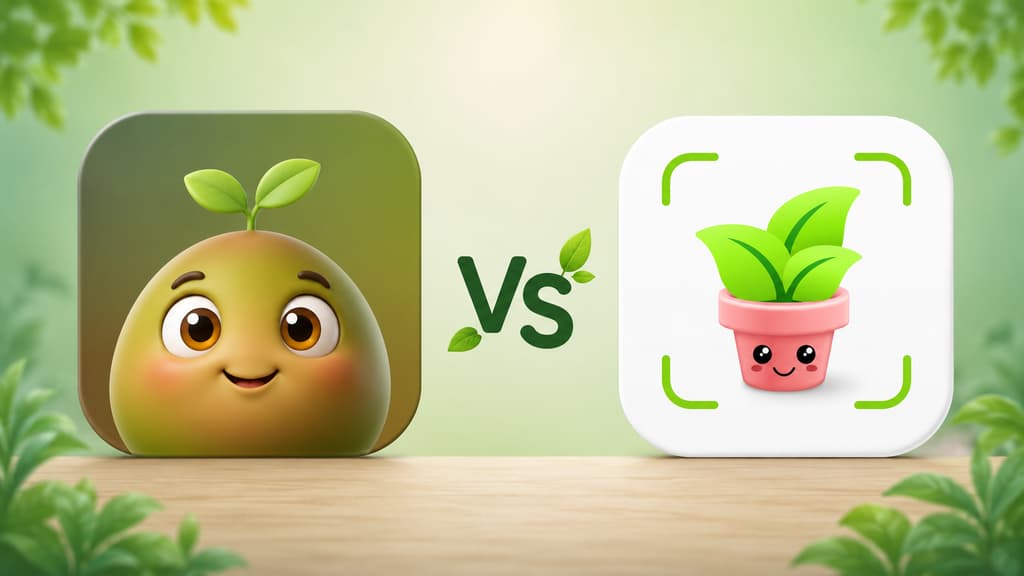
Last year someone gave me a plant as a gift and I stood there staring at it with no idea what it was called. I watered it on a hunch, parked it in the sun on another hunch, and two weeks later it looked like it had given up on me. That is how I fell down the plant app rabbit hole. If you made it here, I think we understand each other. You want an app that figures out the name of that mystery leaf, reminds you to water before it is too late and, ideally, does not nag you every time you tap the screen.
Over the past few weeks I installed two apps that come up a lot in that search: Bloom and Botan. Both promise to identify a plant from a photo, tell you what it needs and help you keep everything alive. But opening one and opening the other feel like two completely different experiences. This article is what I wish I had read before downloading them.
The short version, if you are in a hurry
If you just want to know which one to pick, here is the quick take, mixing in what each one does best.
You want an app that feels like a friend welcoming you in, with a cute character and no forms to fill out before you can use it: Bloom.
You love a dark, sleek, modern look with a serious app feel: Botan.
You have a cat, a dog or a kid at home and you need to know if a plant is toxic: Bloom flags it right on the plant profile.
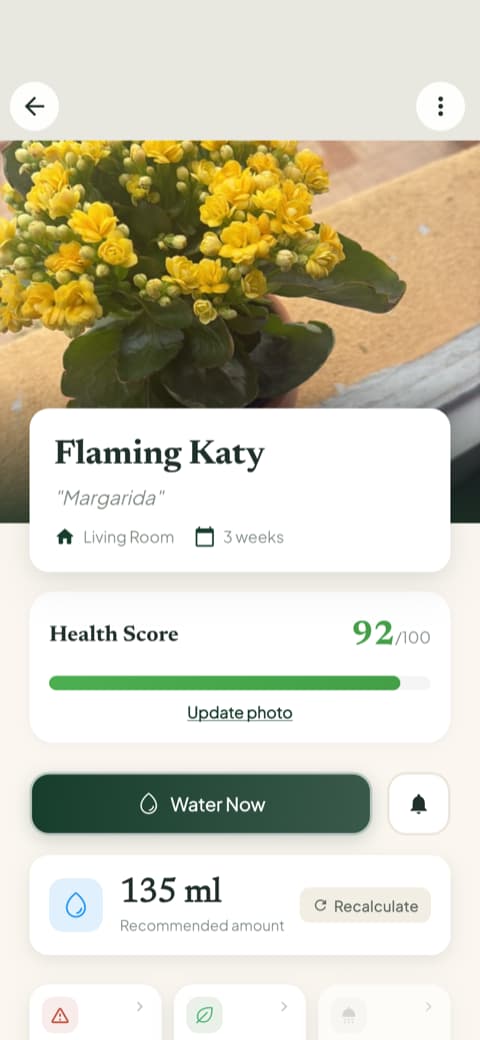
You never know how much water to pour: Bloom gives you the amount in milliliters, calculated for that plant in that pot.
You would rather ask a question by typing it out, like a conversation: Botan has a chat for that.
You want to see at a glance what is overdue and what is due today: Bloom has the schedule for that.
You want disease diagnosis always within reach, on its own tab: Botan.
You want to try things out before committing to anything: Bloom lets you use it and save two plants without signing up for anything.
You only want to learn the name of a plant and get on with your day: either one will do.
Now, if you have a few more minutes with me, I will tell you how each app actually felt, with screenshots so you can see it for yourself.
Getting to know Bloom
The first screen won me over
When you open Bloom, you are greeted by Pip, a little 3D character that looks like a sprout with arms and huge eyes. I know that can sound silly from a distance, but that warm welcome is exactly what the other apps were missing. Instead of a cold list of features, Pip shows up to say hi and to tell you the two of you are going to figure out your plants together.
Bloom shows what it can do first
After Pip says hi, a few short screens walk you through what the app does: identify a plant in seconds, remind you when it is time to water, and figure out what is wrong when a leaf starts looking off. There is a screen just about how accurate the identification is, and another with the rating the community gives the app, along with notes from people who use it.
What I liked most was what did not happen: nobody interviewed me first. No form, no quiz about my gardening level. Bloom shows what it can do and hands you the camera. Under a minute in, I was already pointing my phone at the first plant in the living room.
Identifying an actual plant
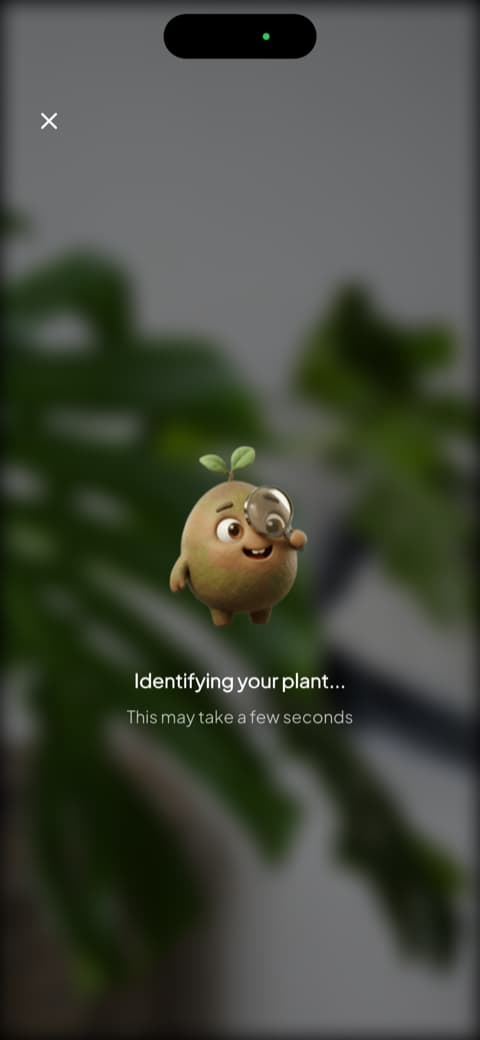
This is where the app shines. You open the camera, point it at the plant, and Pip pops up with a magnifying glass doing his investigation. It is a small thing, I know, but the animation makes the wait more than a spinning wheel. When it finishes, you get the plant profile with the match percentage, the common name, the scientific name and, on that same screen, the care essentials: how often to water, the light it prefers, the temperature range and the ideal humidity.
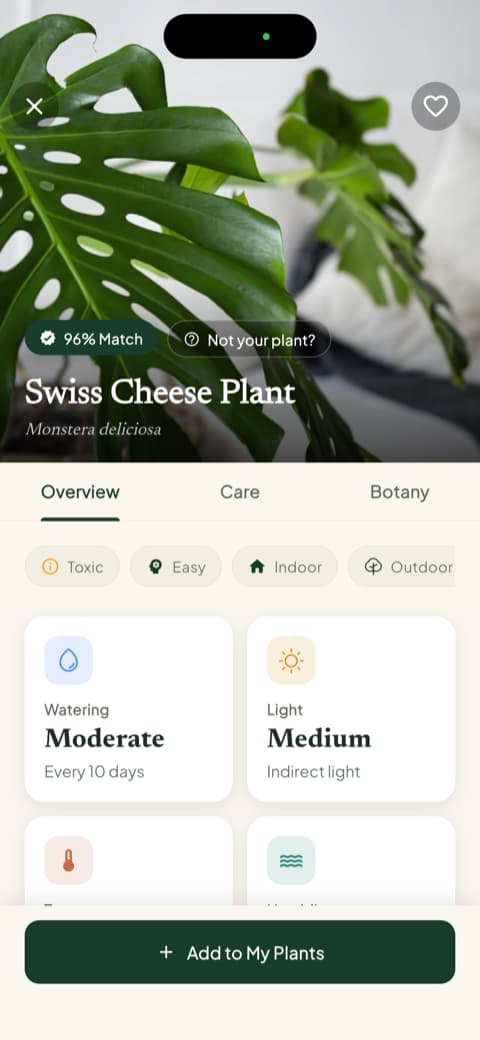
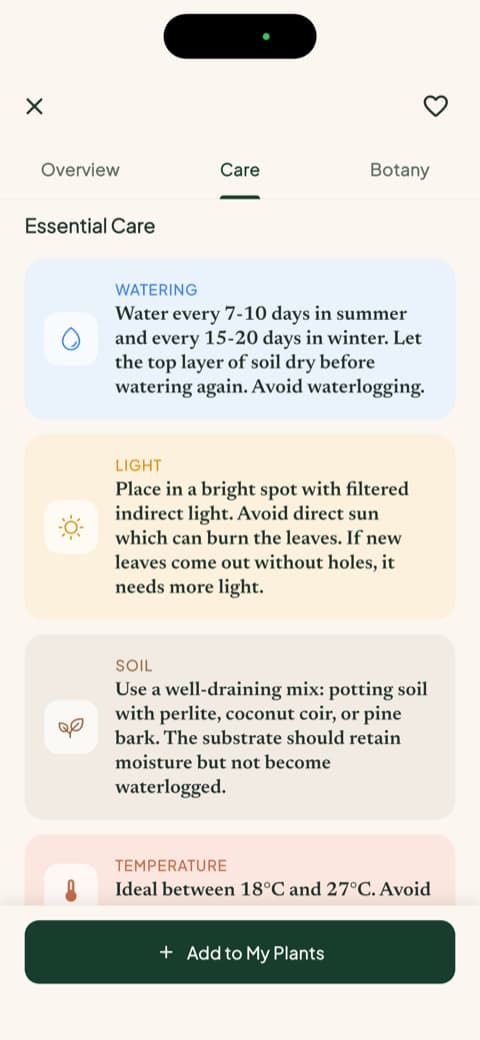
I tested it with a Swiss cheese plant (the famous monstera) and the profile was almost too thorough. It splits into care and botany tabs, with pruning, soil, ideal pot, propagation and even the symbolism of the plant. If you are just starting out, having that much information organized for you makes a huge difference.
Bloom recognizes more than 35,000 species and gets it right about 9 times out of 10, an accuracy rate confirmed in an independent study. In my testing it did not miss once.
The detail I did not know I needed
On that same profile, Bloom shows whether the plant is toxic to cats, dogs and children. It is not buried in a menu anywhere: it sits right there with everything else.
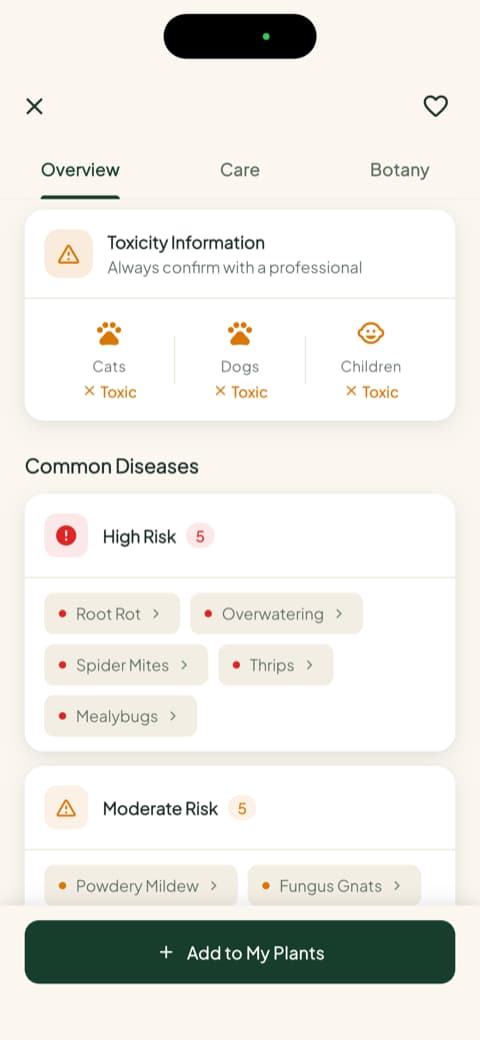
I have a cat. Anyone who does knows they bite first and complain later. That one screen saved me from two purchases I was about to make without thinking.
Saving a plant to your garden
Once you identify a plant, the app asks which room of the house it lives in and adjusts the reminders to the light in that corner. My Garden became my favorite spot: it shows every plant you have saved, with the overdue watering warning right on the card, in red, impossible to ignore.
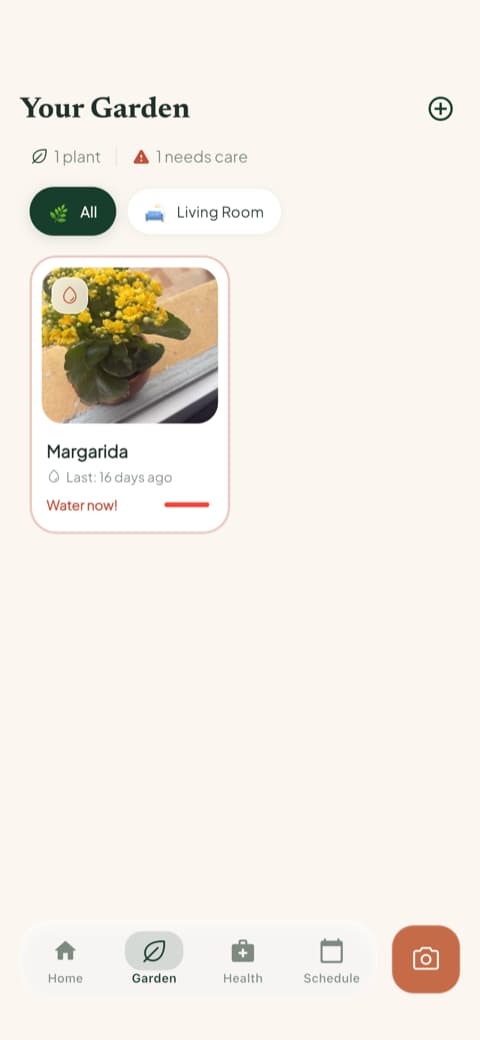
And there is one number I have not seen in any other app: the amount of water in milliliters, calculated for that plant, that pot and that spot in your home. Each plant also gets a health score that shifts as you take care of it.
The schedule that saved me from myself
There is a whole tab just for the schedule, with what is overdue, what is due today, what is coming up and what is already done. Watering, feeding, pruning, rotating the pot, repotting and even the progress photo.
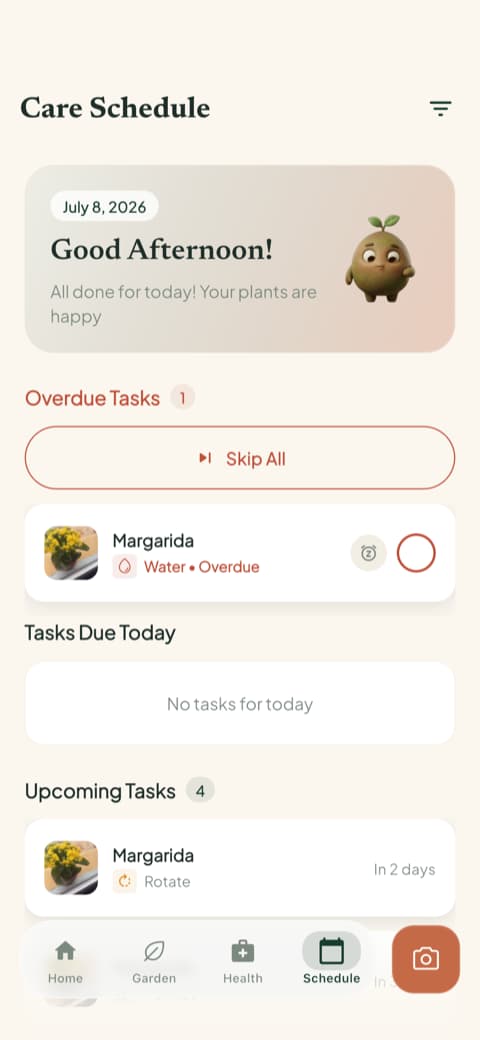
I check it in the morning the same way I check the weather.
Every tool one tap away
The camera button opens a menu with everything you can do: identify a plant, diagnose a disease, measure the light in a room, identify a weed, check toxicity and see water needs.
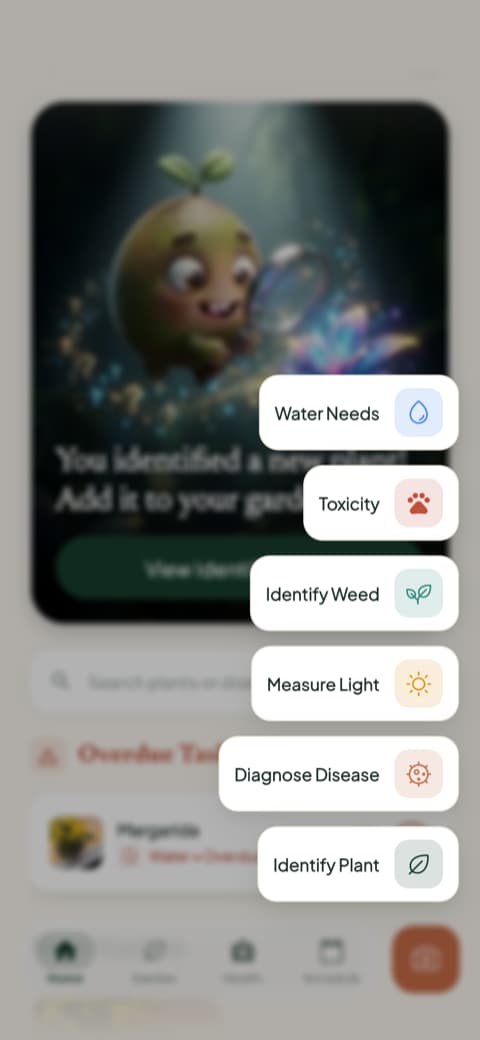
The light meter was a pleasant surprise. I would have sworn that corner of the living room was bright, and it showed me it was not.
Getting to know Botan
The first screen has a very different vibe
Botan takes a different route. Instead of a character saying hi, it opens dark and elegant, with lines of text appearing on screen to welcome you and tell you it is here to be your companion in caring for your plants. You can tell right away that the design is gorgeous, with that modern, serious app feel.
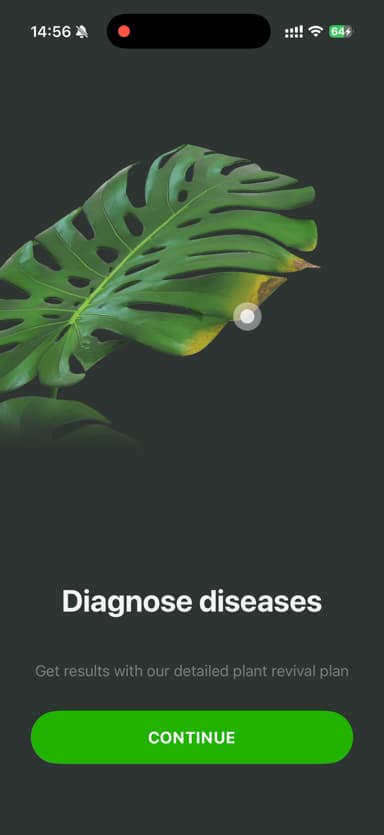
Right after that it shows you what it can do, with a beautiful animation of a Swiss cheese plant leaf being read by the camera and a promise to diagnose diseases, complete with a plan to nurse the sick plant back to health. The illustration inspires confidence.
It explains the reminders before turning them on
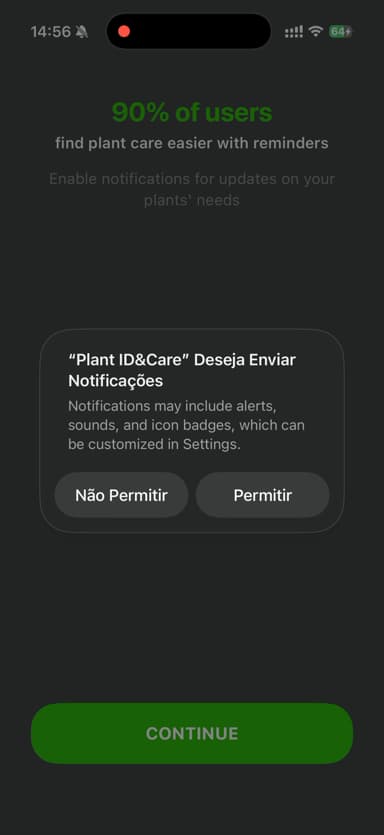
One thing I liked: before switching on the watering alerts, Botan shows a small screen explaining that most people find it easier to keep their plants alive when the app reminds them. You know what you are agreeing to before you agree to it.
A quick lesson on taking the right photo
Before letting you go off photographing anything and everything, Botan shows a guide on how to take the right photo, with examples of what works and what does not. Things like do not get too close, keep the flower in focus, one species per photo. I found that genuinely useful, because a bad photo is the number one thing that keeps any plant app from getting it right. It is a small courtesy that saves you frustration later.
The home screen and the plant chat
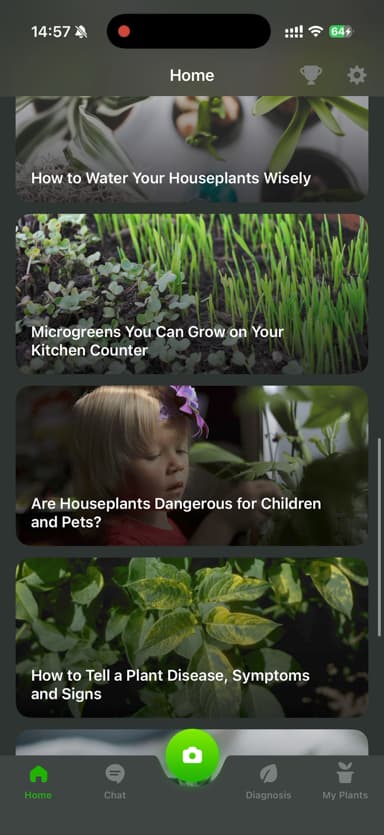
Once you are inside, Botan's main screen is pretty and packed with content, with a list of articles about watering, about microgreens on the kitchen counter, about plants and kids. Along the bottom are the tabs that give you access to what it does: Home, Chat, Diagnosis and My Plants, with the camera in the center.
That Chat is one of Botan's charms. You type your question as if you were talking to someone, and it answers. You can ask things like "my fern has brown tips, what do I do?" and keep the conversation going. If you would rather ask than hunt for the answer in an article, it is very practical.
Comparing them point by point
Now that I have introduced you to both, let me lay out what actually matters when you are deciding. I skipped the overly technical details and stuck to what counts for someone who just wants to take good care of their plants.
Identifying a plant from a photo
Both do this well. I put a succulent, basil, a fern, a monstera and a ZZ plant in front of each one, and neither missed. Bloom delivers a richer profile, with the match percentage, the care essentials on the same screen and botany tabs for anyone who wants to go deeper. Botan is fast and has that photo guide that helps you nail the shot on the first try.
If you only want to learn the name, either one will do. If you want to really understand the plant you were just given, Bloom is a little more generous with its explanations.
Day-to-day plant care
This is where the gap widens. Bloom organizes plants by room, adjusts reminders to the light in each corner, calculates watering in milliliters, gives each plant a health score and pulls it all together in a schedule with overdue items, today's tasks and what is coming up.
Botan also reminds you to care for your plants and keeps everything organized in the My Plants tab. It does the basics well, it just does not reach that level of detail.
Safety for a shared home
This point was not on my radar when I started testing, and it ended up deciding things for me. Bloom tells you, on every plant profile, whether the plant is toxic to cats, dogs and children, and it also lists the most common diseases for that species sorted by risk. Botan does not surface that information with the same prominence.
If you have a pet or a small child at home, that matters more than any design detail.
Content and answers on the spot
Bloom includes detailed care guides inside each plant's profile, covering watering, light, soil, temperature, ideal pot and propagation, written in a way that is genuinely pleasant to read.
Botan also has articles on the home screen and leans on its plant chat, where you ask in your own words and get an answer right away. Two different ways to clear up a doubt, and it comes down to taste: settle in with a guide, or ask and move on with your day.
Look and feel
This one is partly personal taste, but it makes a difference over the long run. Bloom leans bright, colorful and cute, with Pip keeping you company. If you are a beginner who is afraid of messing up, that warmth counts as a feature, not decoration.
Botan has a dark, elegant, modern mood, the kind that looks expensive and reads as serious. It comes down to which mood you prefer.
Disease identification and recovery help
Both handle this, each in their own way. Botan keeps diagnosis front and center, with its own tab and the promise of a plan to bring the plant back, which is reassuring from the start.
Bloom also identifies what has gone wrong (yellow leaf, pest, spot) and, beyond pointing out the problem, tells you what to do and stays with you through the care until the plant improves. When you are anxious and convinced you are about to lose a plant, that step by step is calming.
How each one opens the door
This part weighed on my decision. With Bloom you can get in, identify plants and save two plants to your garden without signing up for anything. You get to know the app with your own real plants before deciding anything.
Botan asks you to sign up right at the beginning, before you have seen it work with a plant of yours. You can move past it, but that is a decision asked far too early for my taste.
For me, trying first and deciding later makes all the difference. That is how I found out the light meter was going to relocate half my plants.
Who is each app for?
Bloom is for you if...
You like it when an app seems to care about you. You are a beginner and you want someone guiding you without judging you. You have more than one plant at home and you want to organize care by room, all in one place. You share your home with a pet or a child and you want to know what is safe. You want to try before you decide. You like a diagnosis that stays with you until the plant recovers.
Botan is for you if...
You love a dark, elegant, modern look. You prefer typing out a question in a chat instead of digging through an article. You want disease diagnosis right at hand. You do not mind signing up the moment you arrive.
My honest conclusion
If you asked me which is the best app to identify and care for plants, my answer would be Bloom. It made me feel welcome, organized my plants by room, told me exactly how much water to pour in milliliters, warned me about what was dangerous for my cat and made me want to open the app in the morning the same way I open Instagram. Pip became my companion and the schedule saved me from myself more than once.
But I would be unfair not to give Botan its credit: it identifies plants well, it is beautiful, it has that dark look that is a pleasure to use, it offers a chat for your questions and it keeps diagnosis right at hand. If you like an app with a more sophisticated edge, it has a charm all its own.
If you are still on the fence, download both and see which one fits the way you care for plants. In my case, Bloom is the one that stayed on my phone.
And if one day that plant you were given starts looking happy again, I will be happy right along with you.
This review was written after testing both apps hands on, on an iPhone. Features and screens may change depending on the app version.
Related articles

The 6 Best Plant Apps for Beginners
New to plants and worried you'll kill them? Here are the six best plant apps for beginners, tested for how easy they make identifying and caring for your first plants.

The 5 Best Apps to Remember to Water Your Plants
Always forgetting to water your plants? Here are the 5 best apps that remember for you, tested for smart reminders that actually fit your routine.

The 7 Best Apps for People Who Always Kill Their Plants
If your plants keep dying no matter how hard you try, these 7 apps were made for you. Here are the ones that actually help keep a plant alive.