PictureThis vs Bloom: Which is the Best Plant Identification App? I Tested Both
I tested both apps side-by-side and dug into what independent research has to say. Here is which one works best for houseplants, which one is better for trees, and which one actually has a free mode.
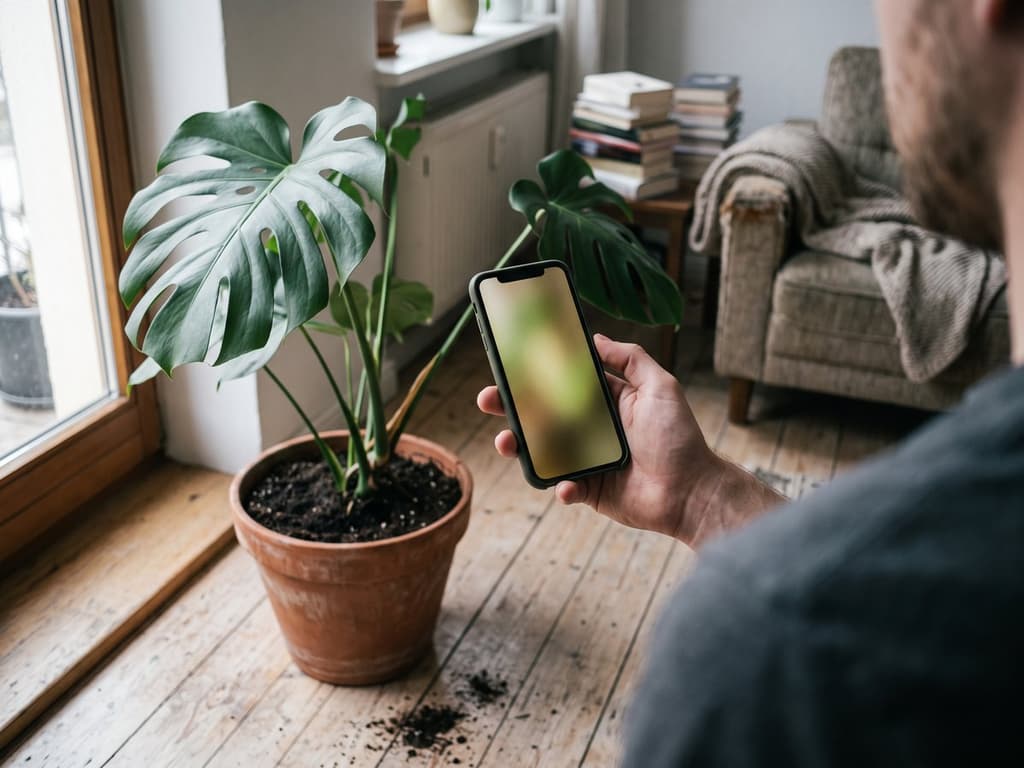
Quick verdict: For houseplants, go with Bloom. It uses Plant.id for identification, has a permanent free mode, gives you watering amounts in milliliters, and shows toxicity info right on the plant's profile. PictureThis remains the go-to choice for trees, weeds, and rare species, where its massive database of 400,000 species makes a huge difference. The two apps have never been compared in the same academic study.
Bloom is the app made by the company that publishes this blog. Because of that, I looked up independent third-party studies instead of just relying on what we say about ourselves, and it is also why you will find the strengths of PictureThis highlighted here, in bold, right in the middle of the page.
I have killed more plants than I care to admit. I bought succulents thinking they were indestructible, left basil on the windowsill for an entire week, and came home one day to find my mother's Swiss cheese plant completely limp, with no idea what went wrong. That was when I started looking for plant identification apps on my phone. I downloaded several, deleted the ones that did not help, and ended up keeping two: Bloom and PictureThis.
Quick answer (if you are in a rush)
If this sounds like you... | The app I would recommend is... |
|---|---|
You are a beginner or have killed more plants than you have kept alive | Bloom |
You want to try it without paying anything, indefinitely | Bloom (has a permanent free mode) |
You never know how much water to add | Bloom (shows the exact amount in milliliters) |
You have cats, dogs, or small children at home | Bloom (toxicity warnings right on the plant profile) |
You want someone to remind you when to water | Bloom |
You deal with trees, weeds in the yard, or rare species | PictureThis (database of 400,000 species) |
You use Android | PictureThis (Bloom is iPhone only) |
Is PictureThis actually free?
This is the question that shows up four times in Google's "people also ask" section, and the answer is completely different for each of these two apps.
Bloom has a permanent free mode. PictureThis does not, offering only a handful of free identifications before requiring a subscription. For anyone who just wants to try an app without entering a credit card, this difference alone is the deciding factor.
With Bloom, the free version never expires. You get 2 identifications per month and the watering schedule forever, without needing a credit card. The paid plan unlocks unlimited identifications, disease diagnosis by photo, and full care guides. You can use the app for months for free, within those limits, and decide later.
With PictureThis, you can identify a few plants before the app blocks you and asks for a subscription. The most common Google search result for this app right now is a thread of users complaining about unexpected charges. It is not that the app is trying to trick you, it is just that the subscription screens pop up very early and the red notification dot is almost always visible. If you download it thinking it is free forever, you will likely end up frustrated.
In this regard, Bloom is the exception, not the rule. Most plant identification apps on the market do not have a real free mode, only a free trial before you hit a paywall.
I am not going to list prices here for a very practical reason: the cost of these apps varies by country and changes without notice. Any number I wrote down would be wrong for half of the people reading this. Your phone's app store will show you the correct price for your country before you confirm anything, and that is the best place to check.
If you already know you want to move away from PictureThis, I wrote a separate piece for who já decidiu trocar de app. But if you are still undecided, let us keep comparing.
How I tested them
I downloaded both on the same phone, using the same camera, and used them for about three weeks. I pointed them at the plants I already had at home (basil, monstera, pothos, succulent, rosemary, and an orchid that survives out of sheer stubbornness), and also at weeds I found on the street to see if they got the names right. Then I tested the diagnosis feature by purposely photographing a yellowing leaf.
I also paid attention to what it feels like to open each app on a normal day. It does not matter if you have the best app in the world if you dread opening it.
The versions tested: PictureThis 5.70.0 and Bloom 1.0.12, both checked on the US App Store on August 22, 2026. Both are iPhone versions.
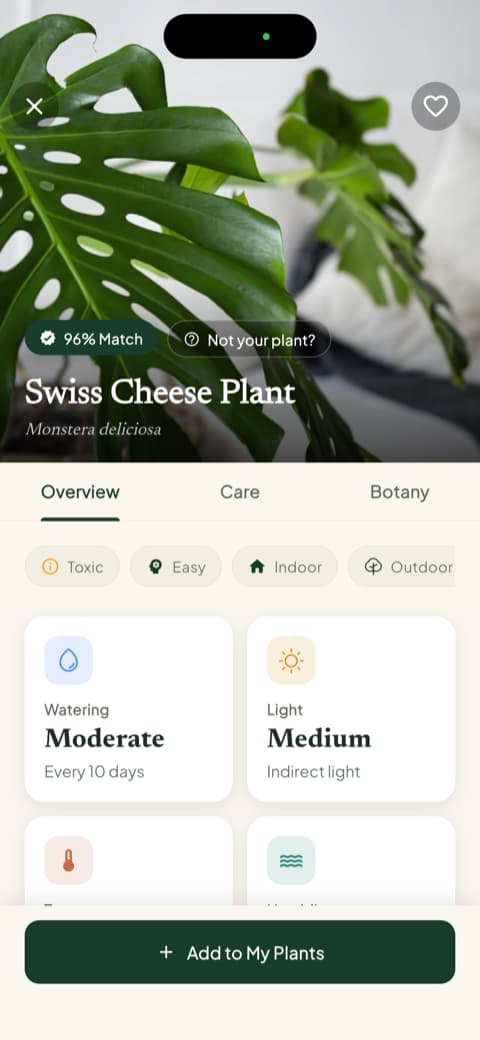
The Swiss cheese plant was the main reference plant I used, since it is one of the most common houseplants and is highly documented in both databases:
A three-week test with half a dozen plants is a small sample size, and I know that. That is why I looked up studies that tested them with much larger sample sizes.
Accuracy: What the independent research measured
This is where almost every plant app review online makes up numbers.
Accuracy in plant identification apps is the percentage of photos where the app gets the plant right. This is measured on two levels: identifying the genus (the group, like "Monstera") and identifying the exact species (like *Monstera deliciosa*). Every app is better at identifying the genus than the species, and every app's accuracy drops when the photo quality decreases.
Three peer-reviewed studies have tested these apps, and none of them were funded or conducted by the app companies themselves.
Study | What it tested | Key finding |
|---|---|---|
9 apps, 38 images of British flora, 5 repetitions each | Plant.id came in first place, which is the engine that Bloom uses: 57% accurate down to the species level and 70% to the genus level. PlantNet scored 39%, Seek 35%, and PlantSnap 24%. It did not test PictureThis. | |
6 apps, 55 tree species, 440 photos of leaves and bark | PictureThis was the most accurate: 97.27% for genus and 83.86% for species in leaf photos. In bark photos, accuracy fell to 65.45% and 51.82%. It did not test Plant.id. | |
6 apps identifying 16 toxic and edible species | Overall average of 76% for genus and 58% for species. PictureThis was at the top (96% and 94%), while PlantSnap was at the bottom (53% and 34%). It did not test Plant.id. |
I took away four key lessons from these studies, and they all changed my perspective.
First, Bloom's identification engine is Plant.id, and Plant.id came in first place in the 2020 study, ahead of PlantNet, Seek, Flora Incognita, and Google Lens. Bloom reports a 93% accuracy rate, verified by independent universities. That is the number the app displays and the one I use here, just as I use the awards shown by PictureThis as their official figure.
Second, the two apps have never been measured in the same study. PictureThis came in first in both studies where it was included, but was not part of the 2020 study. Plant.id came in first in the 2020 study, but was not included in the other two. Anyone claiming to know which of the two is absolutely more accurate will have to wait for a study that tests them head-to-head.
Third, you cannot compare numbers from different studies. The 83.86% score for PictureThis comes from leaf photos of 55 trees in New Jersey, while the 57% score for Plant.id comes from 38 images of British flora specifically chosen to be difficult back in 2020. Reading these side-by-side and drawing a definitive conclusion is the most common mistake in plant app reviews, which is why I will not name a winner here.
Fourth, your photo quality matters more than the app you choose. In the 55-tree study, the exact same PictureThis app went from an 83.86% species accuracy rate with a leaf photo down to 51.82% with a bark photo. It is the same artificial intelligence, on the same day, on the same tree. Take close-up photos of leaves in good light, with only one plant in the frame. Doing this will help more than switching apps.
In practice, during my three weeks of testing, things went exactly as the research suggested: for common houseplants, both apps got them right every time, and both failed to identify the exact same weed in the park.
Bloom: What happens after you take the photo
Let us start with Bloom, which is the one I ended up recommending to most of my friends. When you open it for the first time, a 3D mascot named Pip greets you. It might seem like a small detail, but it sets a friendly tone.
In the app store, Bloom has a rating of 4.8 with over 1,000 reviews across platforms. This is in the same range as PictureThis, which sits at 4.7. The difference is the scale: over a thousand people compared to 2.2 million. If your main decision factor is "millions of people have used and approved this," then this is where Bloom loses, and there is no hiding that.
The identification worked flawlessly for my houseplants. I pointed it at my Swiss cheese plant and it got it right away. I pointed it at my pothos and it got it right. It failed on the weed in the park, the same one PictureThis missed.
The result screen shows the match percentage, common and scientific names, and three tabs: Overview, Care, and Botany. Right on that same screen, you can see cards for watering, light, temperature range, and humidity. You do not need to tap anything else to get the basics.
Once you add a plant to your garden, two features solve a problem I have always struggled with. The first is the health score, which goes from 0 to 100. The second is the watering amount in milliliters, calculated specifically for that plant, that pot size, and its location in your house. Instead of vague advice like "water moderately," you get an actual number. You can recalculate it if you move the pot to a different spot.
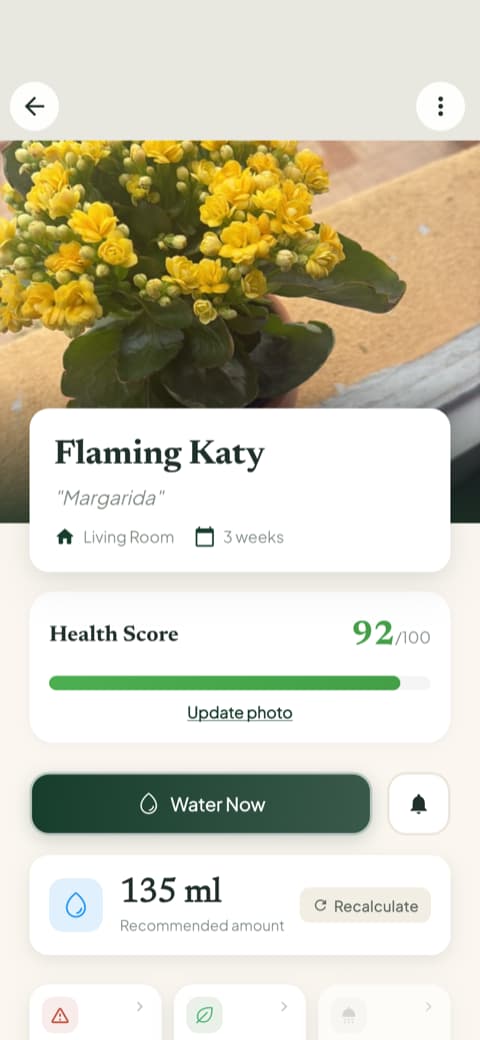
Your garden is organized by room, and each plant card alerts you when watering is overdue. There is a care schedule that separates overdue tasks, today's tasks, upcoming tasks, and completed ones, covering watering, fertilizing, pruning, rotating, repotting, and progress photos. This schedule is what finally stopped me from forgetting about my basil.
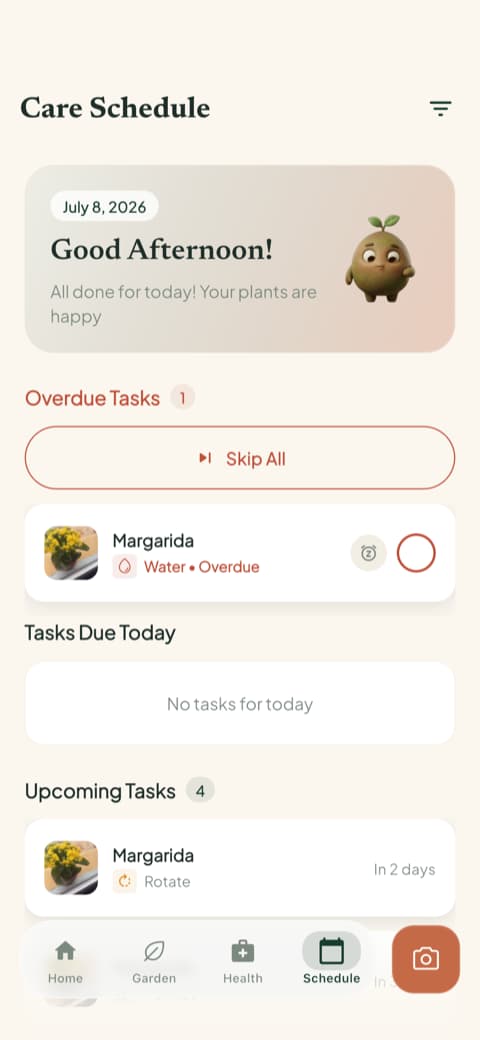
On the plant's profile, even before any issues show up, the app lists the disease risks for that species, categorized as high, moderate, or low, and tells you if it is toxic to cats, dogs, or children. There is also a quick actions menu with a light meter, weed identifier, and toxicity checker. The light meter showed me that the corner where I kept trying to grow succulents was far too dark.
What Bloom does best
Identification powered by Plant.id, with 93% accuracy verified by independent universities
A permanent free mode, which most competitors do not offer
Watering amounts calculated in milliliters based on the plant, pot, and location
Toxicity warnings for cats, dogs, and children right on the plant's profile
A health score and daily care schedule that manages your routine
A quick start, with the camera ready to use in about 40 seconds
Species-specific disease risks listed before your plant even gets sick
Where it falls short
A database of 35,000 species compared to over 400,000 in the competing app
Rare species, trees, and wild weeds are its weak points
Just over 1,000 reviews in the store compared to 2.2 million for PictureThis
The free mode limits you to 2 identifications per month and does not diagnose diseases
Available only on iPhone
PictureThis: The seasoned veteran
PictureThis is likely the first app you saw when you started searching. It has led the category for years, and its store numbers show why: 2,211,115 reviews and a 4.7 rating across 155 App Store locations, checked on August 22, 2026.
This appears right during the first use. The app tells you that it is number 1 in installations, shows a map of the planet with where people use it, and displays a trophy saying it was voted the most accurate for six years in a row, with the Michigan State University seal.

After reading the academic studies, this presentation felt less like pure marketing and more justified than the first time I opened the app.
The trade-off for all this information is the onboarding length. You have to click through eight or more screens telling you how great the app is before you can do anything. I timed it, and it took over a minute. If you downloaded the app because your fern is turning yellow right now, this can be annoying.
However, there is a very clever feature right after that, which is the best product design choice I saw in either app. They set up a dummy plant for you to test the identification feature immediately. The screen says "we prepared a plant for you," and when you tap it, the app simulates identifying a gardenia and shows you its complete profile.
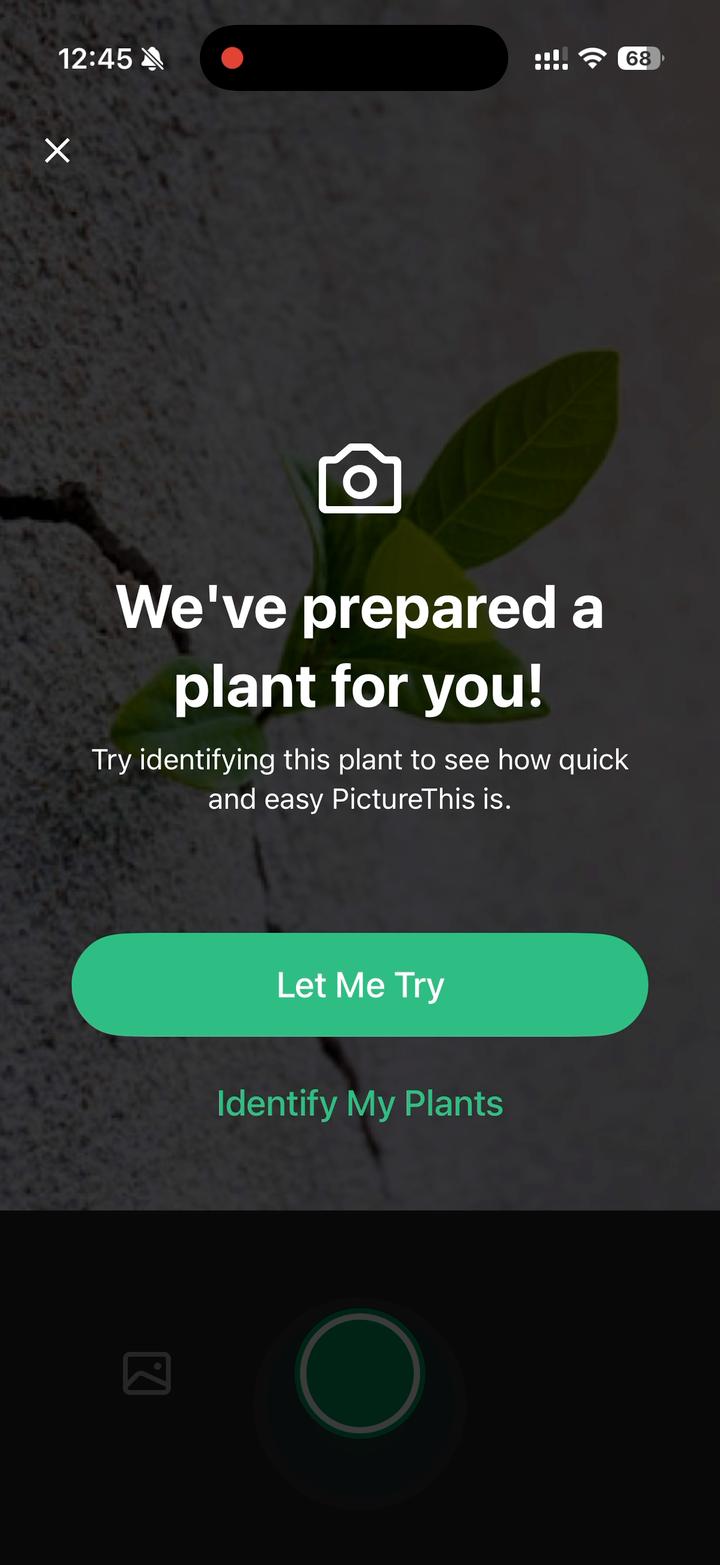
It might seem like a gimmick, but it solves a real problem for users who just downloaded the app and do not have a plant right in front of them.
The care section is solid, though the presentation feels more like an "information sheet" than a "friendly guide." There is a tools menu (water calculator, diagnosis, gardening guide, weed identifier) that feels like a Swiss Army knife for plant care.
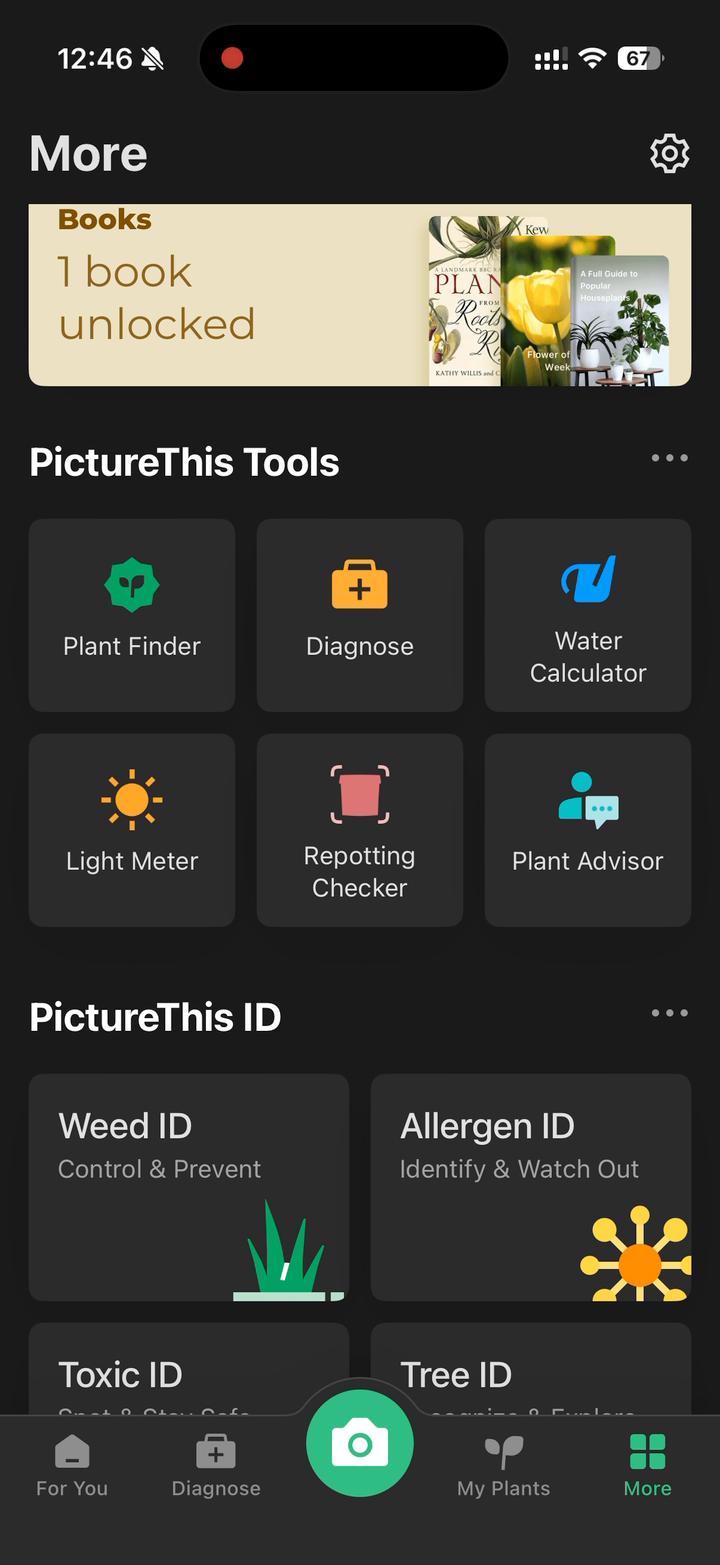
I also want to correct something from a previous version of this article: I had written that PictureThis does not highlight toxicity. That is incorrect. PictureThis has an entire database of toxic plants, which is also available on their website, and they feature this right on their home page. The real difference between the two apps is where this information is shown during your search, not whether it exists.
What PictureThis does best
Took first place in both independent studies in which it was included
A massive database of over 400,000 species compared to Bloom's 35,000
Excellent for trees, weeds, and garden plants where a large database is crucial
A dummy plant feature that lets you test the app before deciding
An established user base and history that no new app can easily match
What was frustrating
The initial onboarding screens take over a minute before you can use the app
The red notification dot urging you to subscribe is almost always visible
The interface feels more like a technical datasheet and less welcoming
It is great at telling you the name of a plant, but less helpful with daily care tasks
Side-by-side comparison
Feature | PictureThis | Bloom |
|---|---|---|
Identification Engine | Proprietary | Plant.id, 1st place in the Jones (2020) study |
Reported Accuracy | 1st place in 2 studies (97.27% genus for leaf photos, Schmidt et al., 2022) | 93%, verified by independent universities |
Claimed Database | Over 400,000 species | Over 35,000 species |
App Store Rating | 4.7 | 4.8 |
Total Reviews | 2,211,115 | Over 1,000 |
Version Tested | 5.70.0 | 1.0.12 |
Time to First Use | Over one minute | About 40 seconds |
Permanent Free Mode | No, only a few identifications before requiring a plan | Yes, 2 identifications per month and a watering schedule |
Disease Diagnosis | Yes, on the paid plan under the tools menu | Yes, on the paid plan, highly visible |
Pet & Child Toxicity | Yes, via their database and website | Yes, right on the plant's profile |
Watering Guidance | Water calculator | In milliliters, based on the plant, pot, and location |
Plant Health Score | No equivalent feature found | Yes, from 0 to 100 |
Care Schedule | Yes, in a standard reminder format | Yes, categorized by overdue, today, future, and completed tasks |
Light Meter | Partial | Yes, in the quick actions menu |
Supported Platforms | iPhone and Android | iPhone only |
Best For | Accurate names, rare species, trees, outdoor gardens | Houseplants, beginners, pet owners |
Bloom is only available on iPhone. If you have an Android device, the comparison ends here and PictureThis is your only option.
No app can definitively decide if a plant is safe
The study published in Clinical Toxicology in 2023 tested identification apps using 16 species from the US Midwest, including both toxic and edible plants. Along with accuracy rates, the researchers noted something critical: 5 of the 11 potentially toxic species were identified as edible by at least one of the apps. The authors' conclusion was clear: in their current state, these apps should not be used to safely identify edible plants.
This applies to both apps in this article, as well as Google Lens. The toxicity information displayed on your screen is just a database lookup, and it is only as reliable as the identification itself. If the app gets the name wrong, it gets the toxicity wrong too, while looking just as confident.
In practice, if you have pets or children at home, the app is useful for one main thing: deciding what to buy. Checking if a species is toxic before bringing a new plant home is a great, low-risk way to use these apps, because you can cross-reference the result with the physical label from the nursery.
What the app should never decide is whether a cat that just chewed on a leaf needs to go to the vet, or whether a weed in your yard is safe to eat. In both of those cases, you should call your local poison control center or a veterinarian, not open your camera app.
Choose Bloom if...
Your plants are houseplants and you feel like you do not have a green thumb
You never know how much water to use and want an actual number, not a guess
You have cats, dogs, or kids and want to check toxicity before buying a plant
You want an organized care schedule, not just a tool to identify names
You use an iPhone
Choose PictureThis if...
Getting the exact species name right is your top priority
You deal with trees, weeds in the yard, or uncommon outdoor species
You use an Android phone
You prefer an established app with years of history and millions of users
You want the largest database available and do not mind searching through it
Final verdict
If your main goal is keeping the plants you already have alive, go with Bloom. The exact milliliter measurements, the structured schedule that keeps you on track, and the toxicity details on the plant profile are the specific features that help a plant survive its first month. Plus, the free mode lets you test all of this without entering a credit card. The identification engine is Plant.id, with a 93% accuracy rate verified by independent universities. Two honest warnings: it is iPhone-only, and it has just over a thousand reviews compared to 2.2 million, so you are choosing a newer app.
If your main goal is identifying trees and outdoor plants, PictureThis wins. It has a database ten times larger, took first place in both studies in which it was included, and works on any phone.
Both apps convinced me in different ways, and I still keep both installed on my phone. If I had to recommend just one to a family member who just bought their very first houseplant, I would suggest Bloom. For someone who already has a garden full of plants with names I cannot pronounce, I would recommend PictureThis.
If you want to check out the rest of the market before deciding, I compared the 8 best plant identification apps and, separately, the apps that diagnose sick plants.
Frequently asked questions
Is PictureThis actually free?
The app is free to download and allows you to identify a few plants before asking for a subscription, but it does not have a permanent free mode. That is why "is PictureThis really free" is the most searched question about it: many users download it expecting it to be free forever. Bloom has a free mode that never expires, offering 2 identifications per month.
Is there a free version of a plant identifier?
It depends on what you consider a free version. With PictureThis, you get a few identifications before hitting a paywall. With Bloom, there is a permanent free mode that offers 2 identifications per month and the watering schedule with no expiration date. Most identification apps do not offer a true free mode, only a trial period.
What is the best free plant identification app?
Among those with a genuine free mode, Bloom offers the most features beyond basic identification: 2 identifications per month, a watering schedule, and care guides with no time limit. PlantNet is unlimited and free because it is an academic project, but in the Jones (2020) study, it was only 39% accurate down to the species level, compared to 57% for the top performer in that same test, and it does not offer care guides or reminders.
Are these apps actually accurate at naming plants?
Most of the time, yes, but with one important catch. PictureThis was 83.86% accurate down to the species level for leaf photos in the Schmidt et al. (2022) study, but that accuracy fell to 51.82% for bark photos. Taking a close-up photo of a leaf in good light with only one plant in the frame will improve your results more than switching apps.
Can you take a photo of a plant and have Google identify it?
Yes, you can use Google Lens for free. In the Jones (2020) study, it was 45% accurate down to the species level, placing it behind Plant.id but ahead of PlantNet. What it does not do is help you care for the plant afterward: it will not save your plants, calculate watering, warn you about toxicity, or send you reminders.
Can these apps tell me what is wrong with my plant?
They can identify common issues like overwatering, sunburn, and fungal infections, though photo diagnosis is a paid feature in both apps. I photographed a yellow leaf and both apps gave similar diagnoses. Bloom also lists disease risks for each species by severity before any symptoms even appear.
Can I use both apps together?
Yes, and that is what I ended up doing. I use PictureThis when I see an interesting plant on the street and want to know its name, and I use Bloom for the plants in my home that need to be watered on a schedule. If you only want to use one, decide based on which of those two problems is most important to you.
Tested in August 2026, using version 5.70.0 of PictureThis and version 1.0.12 of Bloom. Store ratings aggregated from App Store locations on August 22, 2026. Bloom is developed by the company that publishes this blog: third-party accuracy rates are cited with their respective studies and years, and figures claimed by the apps themselves are stated as such.
Related articles

The 5 Best Apps to Remember to Water Your Plants
Always forgetting to water your plants? Here are the 5 best apps that remember for you, tested for smart reminders that actually fit your routine.

The 6 Best Plant Apps for Beginners
New to plants and worried you'll kill them? Here are the six best plant apps for beginners, tested for how easy they make identifying and caring for your first plants.

The 7 Best Apps for People Who Always Kill Their Plants
If your plants keep dying no matter how hard you try, these 7 apps were made for you. Here are the ones that actually help keep a plant alive.