Plantiary or Bloom: which is the best app to identify and care for plants?
Plantiary or Bloom? I used both plant apps in my everyday routine and I will tell you straight which one is actually worth it for identifying and caring for your plants.
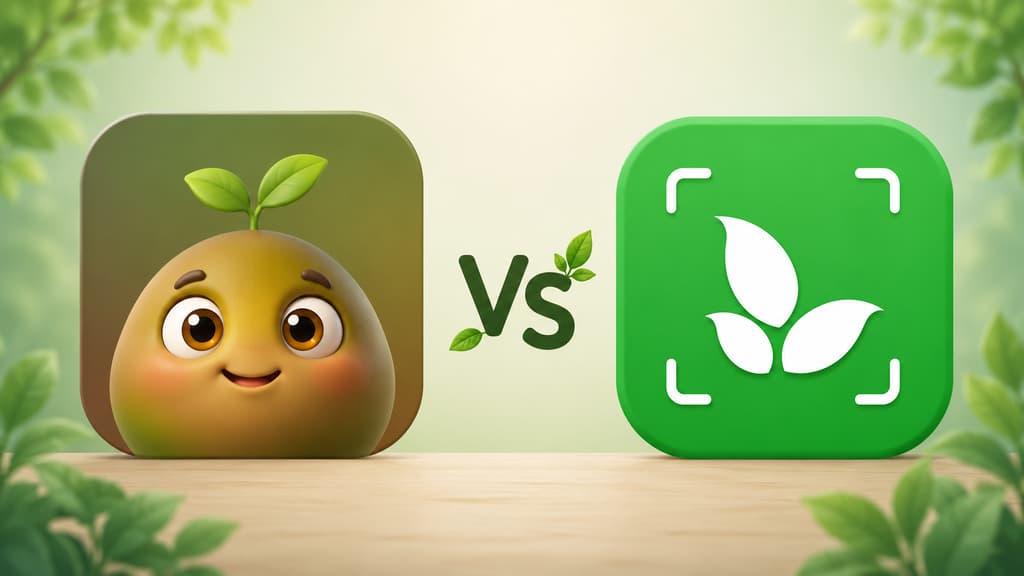
I have lost count of how many little plants have died on my watch. I started looking for a plant app because I was tired of guessing, never knowing if my fern was thirsty, getting too much sun, or just in a mood. If you made it here, I think we understand each other. You want an app that figures out the name of that plant somebody gave you, reminds you to water at the right time, and lets you try things out before you commit to anything.
Over the past few weeks I downloaded two apps I kept seeing everywhere: Bloom and Plantiary. Both promise to identify a plant from a photo, hand you care tips, and hold your hand so nothing dies. But using one and using the other are very different experiences, right from the first tap. This is the article I wish I had read before installing both.
The short version for anyone in a hurry
If you just want to know which one to pick, here is the quick answer.
You want an app that feels like a friend walking you through it, with a cute character and an easy, low pressure start: Bloom.
You have several plants and want your care routine organized room by room: Bloom.
You want to know whether a plant is toxic to your cat, your dog, or your kids before you put it in the living room: Bloom spells that out on the plant page.
You are tired of watering by eyeball and want to know how many milliliters that plant actually needs: Bloom does the math.
You want to find out what is wrong with a sick plant and get walked through the fix: Bloom diagnoses it and tells you what to do.
You want to try things out before signing up for anything: Bloom lets you walk in and use it.
You want to go beyond plants and identify critters like butterflies and spiders: Plantiary does that.
You like asking a plant assistant questions in a chat: Plantiary has that feature.
Now, if you have a few more minutes with me, I will tell you how each app actually felt, with screenshots so you can see it for yourself.
Getting to know Bloom
The very first screen won me over
When you open Bloom, you are greeted by Pip, a little 3D character that looks like a sprout with arms and enormous eyes. I know it can sound silly from the outside, but that warmth is exactly what the other apps were missing. Instead of a cold list of features, Pip shows up to say hi and tell you the two of you are going to figure out what is going on with your plants together.
Bloom shows what it can do first
After Pip says hi, Bloom does not ask me a single thing. It runs through a few short screens showing what it can do: identify a plant in seconds, tell you when it is watering day, and explain what is going on when a leaf starts looking strange. It is quick, you swipe through and you already understand what the app is setting out to solve.
There is also a screen with the community rating, 4.8, and notes from people already using it. And that is it, you are in, camera in hand. I will admit I liked not having to answer anything before trying it. I wanted to see the app work on my plant, not talk about myself.
When it shows off its identification skills
At some point a friendly comparison pops up showing how Bloom performs at identification: roughly 9 correct out of every 10 tries, drawing on a base of more than 35,000 species with independent validation. I thought the chart was cute, but what really counts is testing it. Spoiler: with the common plants I put in front of the camera, it got every single one right.
Identifying a real plant
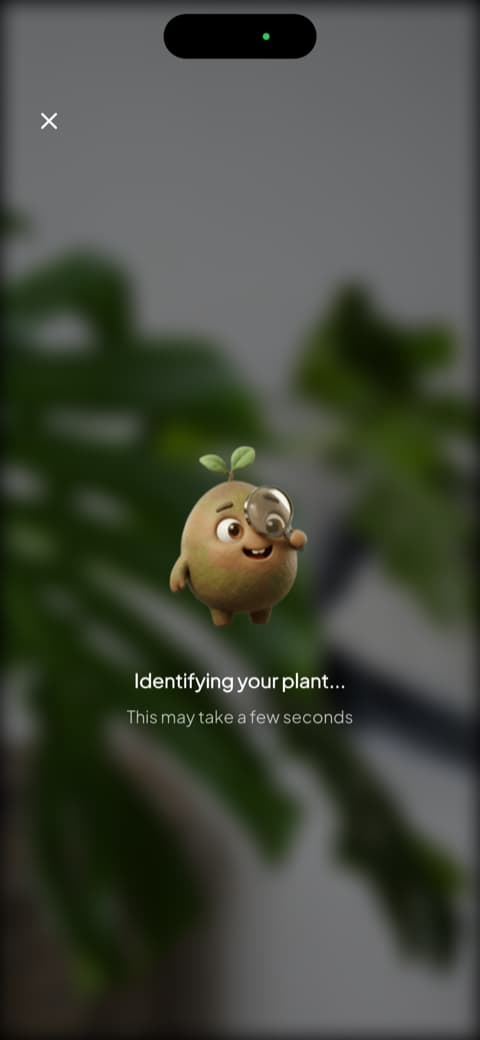
This is where the app shines. You open the camera, point it at the plant, and Pip shows up with a magnifying glass, investigating. It is a little goofy, I know, but the animation means the wait is not just a spinning wheel. When it finishes, you get the plant page with the match percentage, the common name, the scientific name, and tabs for overview, care, and botany.
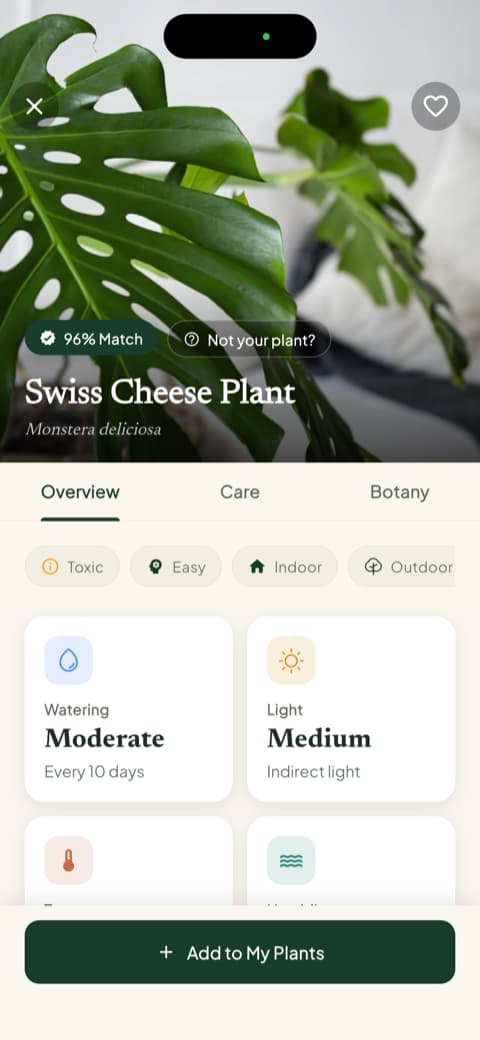
I tested it with a Swiss cheese plant (the famous monstera) and the page came back with far more than I expected. Right on the first screen you get watering frequency, light type, temperature range, and ideal humidity. Scroll down a bit and you hit the part I now check every time: toxicity for cats, dogs, and children, stated plainly. I have a cat and a small nephew at home, so knowing that before picking a spot for the pot changed the way I shop for plants.
There is one detail I found very smart. Right after those intro screens, Bloom shows a screen that says "Let's identify your first plant!" and gives you three paths: open the camera, see an example, or come back to it later. That "See an example" option is what won me over, because even without a plant nearby to photograph, you tap it and the app runs identification on a photo it already has ready. If you are just curious and have nothing to point the camera at yet, it is a lovely way to feel the app working.
Saving a plant to your garden
Once it identifies the plant, the app asks which room of the house it lives in. I saved mine as the fern on the kitchen windowsill, and it adjusted the care routine for that light.
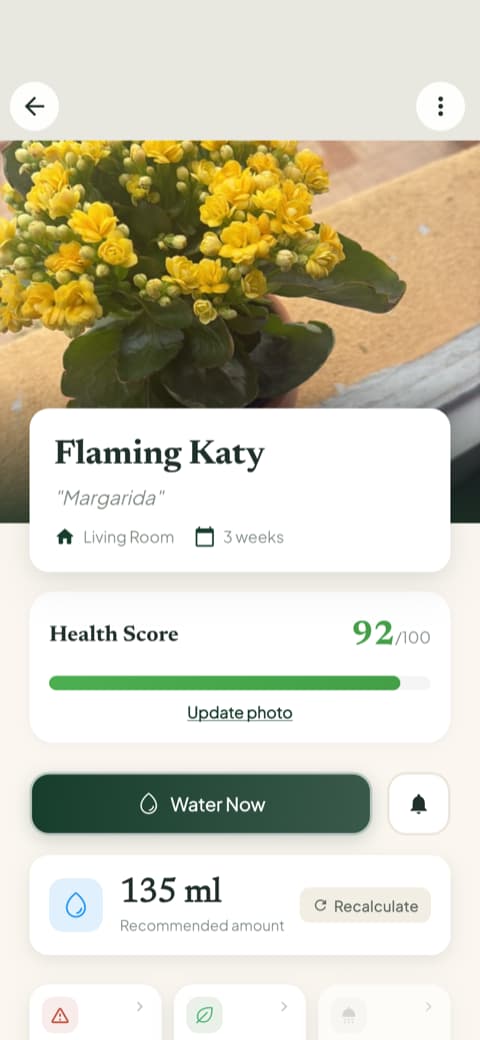
What I did not expect is what comes next. Each plant gets a health score from 0 to 100 and a watering button that does not just say "give it a splash": it tells you how many milliliters that plant needs, factoring in pot size and where it sits, with an option to recalculate if you move it. For someone who has always watered by eyeball, like me, that solved half my problems.
The home screen and "My Garden"
Bloom's home screen is not cluttered. One glance and you know where to go. The camera button opens a quick-action menu with identify plant, diagnose disease, measure light, identify weed, check toxicity, and see water needs. The weed one kept me entertained for a while in my mom's backyard, and the light meter revealed that the corner where I kept insisting on putting succulents was far too dark.
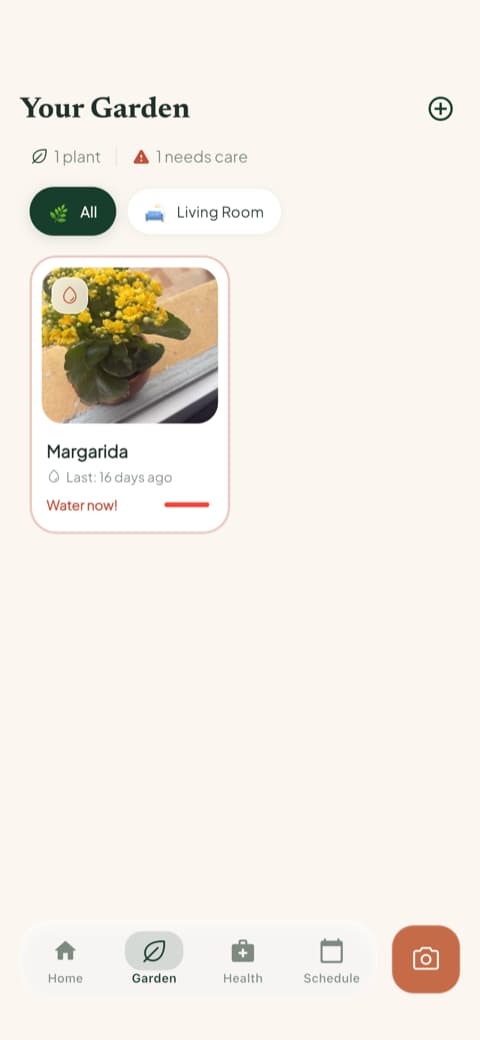
And "My Garden" became my favorite place. It is a visual list of every plant you have added, organized by room, and the card itself flags when watering is overdue. I check it in the morning the same way I check the weather.
Content actually worth reading
Every plant comes with detailed care guides covering watering, light, soil, temperature, ideal pot, and propagation, plus a botany section with classification, symbolism, and blooming. It also lists that species' disease risks, split into high, moderate, and low, which helped me know what to watch for before trouble showed up. I opened the rosemary guide out of curiosity and caught myself reading it to the end. The app entertains as much as it helps.
A schedule that genuinely helps
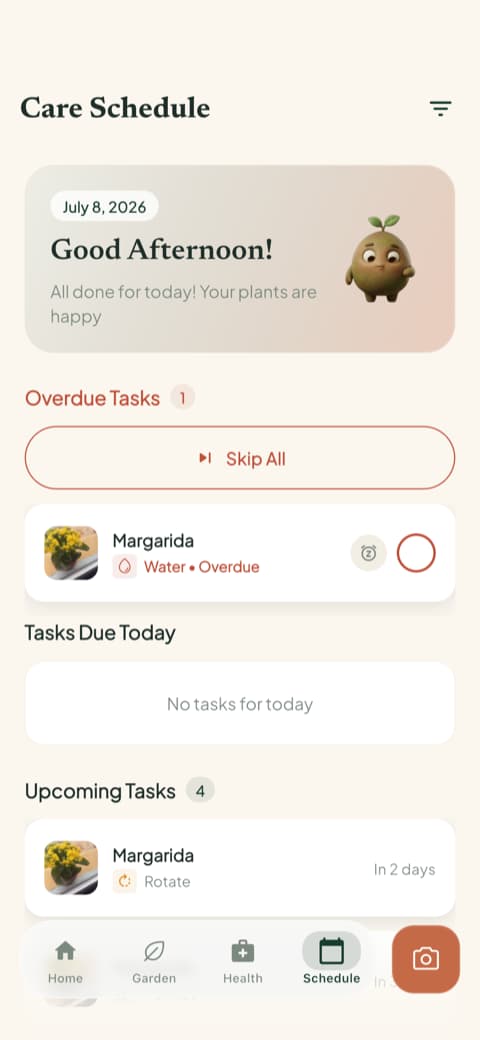
Bloom's reminders turn into a care schedule with overdue tasks, today's tasks, upcoming ones, and the ones you have already checked off. It is not only watering: fertilizing, pruning, rotating the pot, repotting, and even progress photos are in there. And those photos are saved in a history alongside the plant's timeline, so you can put two months side by side. That is how my basil got rescued.
Getting to know Plantiary
The first screen gets straight to the point
Plantiary starts out differently. Instead of a character saying hi, it walks you through a few screens showing what it can do. The first one comes right out and says it identifies plants and diseases, with that animation of an orchid being read by the camera. It is direct, and you understand the pitch in seconds.
Next it shows the care guides, with icons for water, light, temperature, difficulty level, and even toxicity. I found that way of summarizing everything into little icons pretty practical. One glance and you know what the plant is asking for.
Two features that caught my eye
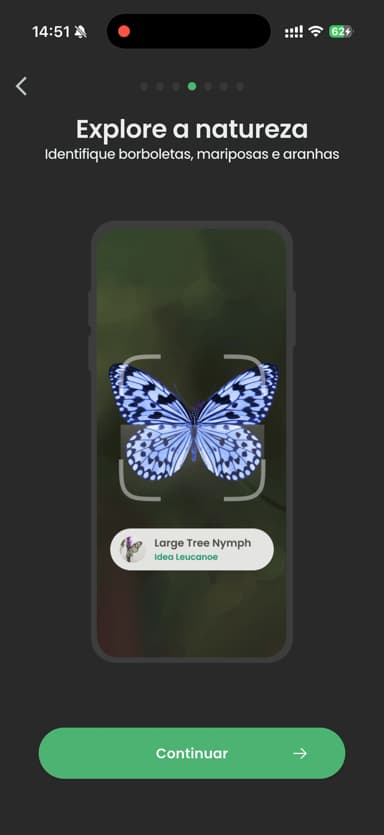
Here Plantiary has two tricks Bloom does not, and I have to be honest with you about that. The first is that it also identifies wildlife, like butterflies, moths, and spiders. If you enjoy going out for a walk and getting curious about whatever turns up along the way, that is an extra bit of charm.
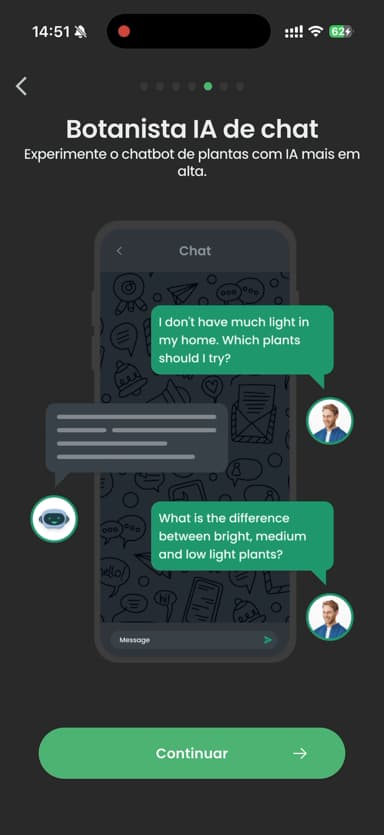
The second is the plant assistant chat. You type your question as if you were talking to someone, and it answers. You can ask things like "I do not get much light at home, what plants can I keep?" If you like clearing up doubts on the spot without hunting through an article, it is genuinely handy.
A few questions before you get in
Before letting you in, Plantiary also asks a few quick questions to get to know you: how much time you want to spend on your plants, what your experience level is (there is a "hopeless" option that got a smile out of me), and where your plants live. The two take different paths here: Plantiary wants to get to know you before letting you in, while Bloom gets straight to the point, shows you what it does, and lets you use it.
One thing that bugged me a little
I will be honest with you here, because it is the kind of thing I would want someone to warn me about. In the middle of those questions, before I had actually used the app at all, Plantiary asked me to give it 5 stars. That felt way too early. I had not identified a single plant yet, so how was I supposed to know whether it deserved 5 stars? It is not a dealbreaker, and one tap gets you past it, but it chips away a bit at that feeling of being taken care of.
The home screen is pretty and packed
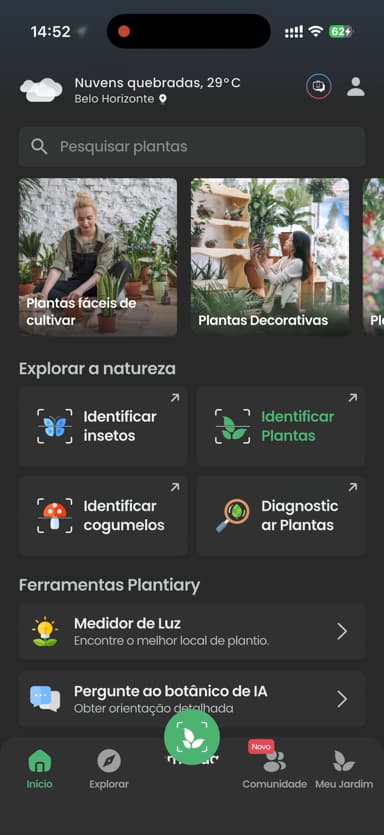
Once you are inside, Plantiary's home screen is nicely put together. Your local weather sits at the top, below that come suggestions for easy-to-grow and decorative plants, and there is a row of tools: identify plants, identify insects, identify mushrooms, diagnose a plant, light meter, and the botanist chat. If you like having everything within reach, it is a rich screen.
Comparing them point by point
Now that you have met both, let me lay out what actually matters when it comes time to decide. I skipped the very technical details and stuck to what counts for someone who just wants to take good care of their plants.
Identifying a plant from a photo
Both identify well. I put a succulent, basil, a fern, a monstera, and a ZZ plant in front of each one, and neither missed. Bloom hands you a fuller page, with match percentage, watering, light, temperature, humidity, and toxicity for cats, dogs, and children right there, and every identification turns into a mini lesson. Plantiary is fast and throws in that bonus of identifying insects and mushrooms too, so if your curiosity runs past houseplants, it has you covered.
If you only want the name, either one gets the job done. If you want to really understand what you just brought home, Bloom is a little more generous with the explaining.
Everyday plant care
Bloom put real thought into organization. When you add a plant to your garden, it asks which room it lives in and tunes the care routine to that spot in the house. The schedule separates what is overdue, what is due today, and what is coming up, and each plant has its own health score and water amount in milliliters. If you have plants scattered around the house, that room-by-room split keeps anyone from being forgotten.
Plantiary also reminds you to water, fertilize, and generally look after things, and it puts your local weather right up front, which helps you gauge whether it is going to be blazing or rainy for your outdoor plants. It is care done well, it just lacks that room-by-room split and the water calculation I liked so much in Bloom.
If you are like me and occasionally forget the cat's name, you will appreciate an app that reminds you at the right moment without piling on.
Content and answers on the spot
Bloom gives you long, well-organized guides for each plant, with a practical section and a botany section, plus the care history and progress photos so you can watch things evolve. I opened one meaning to skim and read the whole thing. If you like learning while you tend to things, that carries weight.
Plantiary leans more on the plant chat. Instead of sending you off to read an article, it lets you ask in your own words and answers right away. Those are two different ways to clear up a doubt, and it comes down to taste: read at your own pace, or ask and move on.
Look and feel
This one is partly personal taste, but it matters over the long run. Bloom leans bright, colorful, and cute, with Pip keeping you company. If you are a beginner who is afraid of messing up, that warmth counts as a feature, not decoration.
Plantiary has a darker, more modern feel, handsome and elegant, the kind of look that reads as serious. It comes down to which mood you prefer.
Disease identification and help recovering
This is where Bloom made me feel safe. It not only identifies what is wrong (yellow leaf, pest, spot) but also tells you what to do and stays with you through the care routine until the plant recovers. It even shows the most common disease risks for that species, so you can prevent instead of scramble. I liked understanding right from the start that it was going to help me save the sick plant, not just point out that something was off.
Plantiary identifies diseases too, so the feature exists in both. The difference is that Bloom puts the step-by-step recovery plan front and center.
How each one lets you in
This part shifted my impression of both quite a bit, so it is worth telling.
With Bloom you walk in and use it. You can identify a plant and add two plants to your garden without signing up for anything, with reminders working and the full plant page in front of you. In other words, you get a feel for the app before deciding anything, and you decide knowing exactly what you are getting.
With Plantiary the sign-up screen appears at the end of the opening questions, before you identify your first plant, and there is no close button and no skip. It is frustrating precisely because the app looks good: I wanted to watch it nail one of my own photos before committing, and I could not.
Who is each app for?
Bloom is for you if...
You like it when an app seems to care about you. You are a beginner and want someone guiding you without judging. You have more than one plant at home and want the care organized room by room, all in one place. You want to know how many milliliters of water to give and whether that leaf is dangerous for your pet or your kids. You like reading complete guides about the plants you own, tracking their health through photos, and getting a diagnosis that stays with you until the plant improves. And you want to try before you sign up.
Plantiary is for you if...
You want to go beyond plants and identify critters like butterflies, spiders, and mushrooms. You enjoy clearing up doubts by chatting instead of reading an article. You like a darker, more modern look with your local weather right on the home screen, and you do not mind signing up before you get to know it.
My honest conclusion
If you asked me which is the best app to identify and care for plants, my answer would be Bloom. It made me feel welcome, organized my plants by room, told me how much water to give each one, warned me what was toxic to my cat, and made me want to open the app in the morning the same way I open Instagram. Pip became my company, the guides won me over for good, and being able to use it before signing up counted for a lot.
But I would be unfair if I did not give Plantiary its credit: it identifies well, it looks great, it has that clever insect and mushroom identification, it offers a chat for questions, and it delivers what it promises. If you like exploring nature beyond your houseplants, it has a charm of its own. My only real gripe is that it asks you to sign up before letting you see the app work.
If you are still on the fence, start with Bloom, which lets you walk in and test it on your own plants. That is how I decided, and it is the one that stayed on my phone.
And if one day your fern starts looking happy again, I will be happy right along with you.
This review was written after testing both apps hands on, on an iPhone. Each app's features may change depending on your region and the version you download.
Related articles

The 5 Best Apps to Remember to Water Your Plants
Always forgetting to water your plants? Here are the 5 best apps that remember for you, tested for smart reminders that actually fit your routine.

The 6 Best Plant Apps for Beginners
New to plants and worried you'll kill them? Here are the six best plant apps for beginners, tested for how easy they make identifying and caring for your first plants.

The 7 Best Apps for People Who Always Kill Their Plants
If your plants keep dying no matter how hard you try, these 7 apps were made for you. Here are the ones that actually help keep a plant alive.